UI designer @double_asa's open-source DSH to Figma lets AI edit a Figma file from one sentence: DeepSeek Harness changes native layers directly and does not use Figma MCP quota
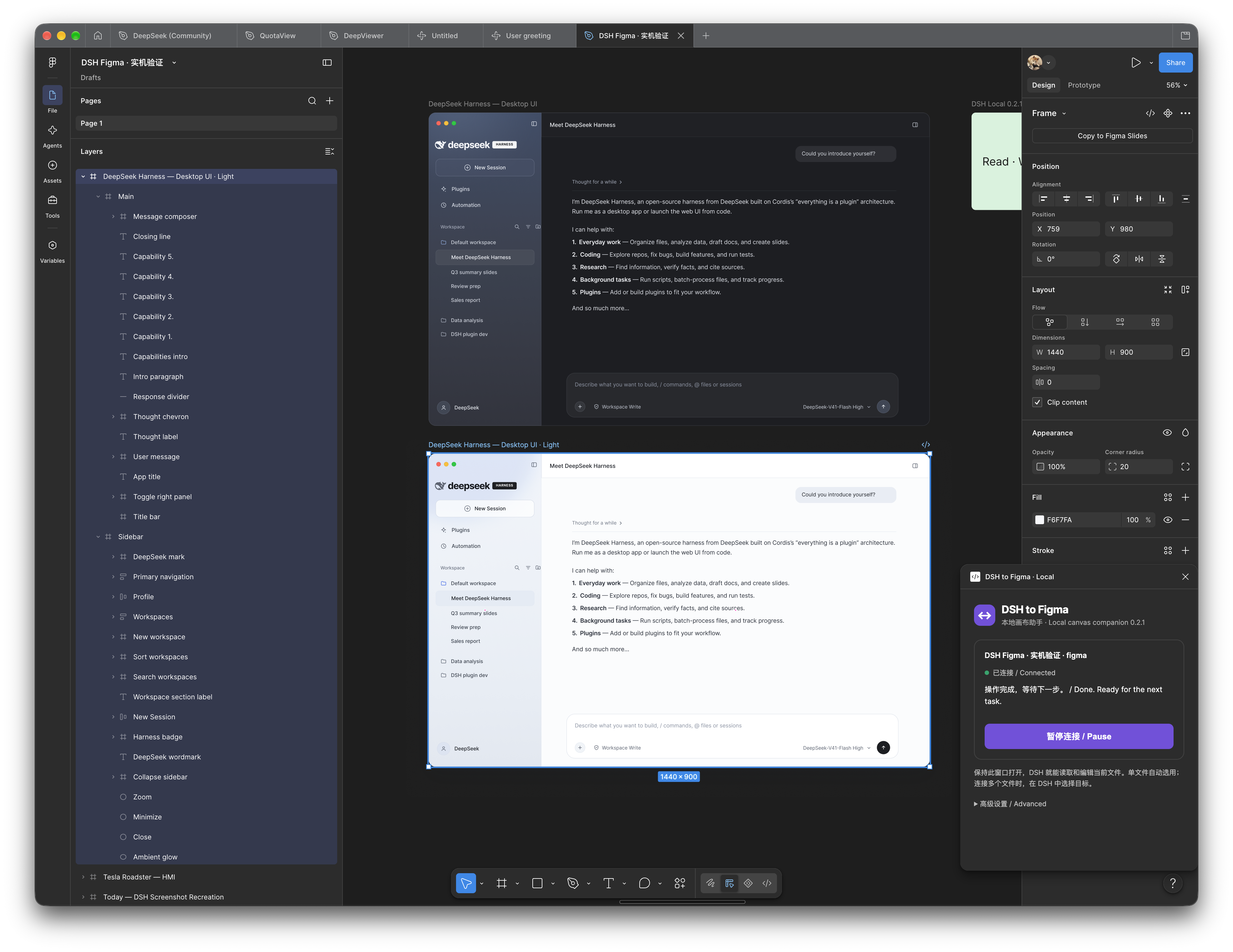
UI designer and indie dev asa (@double_asa) built a DeepSeek Harness (DSH) plugin (MIT): a local service talks to a Figma desktop plugin so DSH can read the selected frame and create/edit native layers, components, variables and auto layout—output you can keep editing by hand, not a flat image or code dump. The author's Oct 19 demo: three sentences took a dark UI → a light version on a new frame → a terminal-style version. We cloned v0.3.2, ran its test suite (80 tests: 79 pass, 1 skipped) and verified the release tarball SHA-256; without DSH or Figma desktop we did no end-to-end edit.
Visit site DSH to Figma(Duoasa/DSH-to-Figma) ↗- Pricing
- Free
- Region
- China
- Where it's from
- Chinese community
- Added
- Nov 3, 2026
- Tested on
- Nov 3, 2026
- Version we used
- Duoasa/DSH-to-Figma v0.3.2 (commit bc0ab40); tests on Node 20.19; not connected to Figma
- Original author
- asa (Duoasa) @double_asa ↗
- Our test
- Partly tested
- Cost / time
- Plugin is MIT and free; local mode doesn't use Figma's metered MCP; Figma's free desktop app can import development plugins. Model usage is billed by whatever model you run in DSH—heavy multi-round edits burn tokens.
The task
Designers hand off post-approval grunt work (laying out pages, unifying buttons/spacing, adding states, style variants) to AI; developers without design skills get an editable UI in Figma before writing code.
Steps
- Prereqs: DeepSeek Harness (DSH desktop or another host) and Figma desktop; the plugin targets Node ≥ 22.
- Send the README's install prompt to DSH: it fetches dsh-to-figma-<version>.tgz and SHA256SUMS from the latest GitHub Release, verifies them and installs in local mode via `dsh plugin --profile <profile> add`. Or do it by hand: download the tgz, `sha256sum -c`, run the same command.
- DSH calls figma_setup and returns the path to a locally paired manifest.json (usually `~/.dsh/figma/companion/manifest.json`). In Figma desktop: Plugins → Development → Import plugin from manifest…
- Open the target file, run "DSH to Figma · Local" and keep the plugin window open.
- Back in DSH, ask "Can you see the frame I selected?" to confirm the link (it returns frame name, size, layer tree and a screenshot).
- Then give edit instructions such as the prompt below; always ask for a new frame so the original stays for comparison and rollback.
Prompt
Turn this UI into a light-mode version on a new frame, leave the original untouched, and send me a screenshot when done.
What the author says
@double_asa: one sentence and AI edits right in your Figma frame, completely free with no MCP call limits; delivers native layers, components and variables you can keep editing; local mode connects straight to Figma without spending official MCP quota, so iterate as much as you like. Oct 19 run, three sentences: read a 1440×900 frame → light version → terminal-style version. Listed in awesome-dsh-plugin.
Our test
Cloned Duoasa/DSH-to-Figma (commit bc0ab40, v0.3.2, 2026-11-02); on the box with Node 20.19 ran `npm ci --ignore-scripts && npm test`; downloaded dsh-to-figma-0.3.2.tgz and SHA256SUMS from GitHub Release v0.3.2, ran `sha256sum -c`, and confirmed the packaged package.json says 0.3.2; read the Chinese README install/pairing docs. No DeepSeek Harness or Figma desktop—no plugin install, no canvas connection, no edits.
What we found when we tried it:node --test ran 80 tests: 79 pass, 0 fail, 1 skipped (a zstd session-analysis test; Node 20 lacks zlib.zstdCompressSync), about 1 s; coverage spans the bridge, plugin, script preflight, OAuth assets and performance. The release tarball SHA-256 matched SHA256SUMS. Running `node cli.mjs --help` without DSH just returns a command_failed message, so the CLI needs a DSH environment. docs/evidence holds the author's Oct 18 local vs desktop MCP records, which we did not reproduce.
How to get in
Public GitHub with Chinese/English/Japanese READMEs. Needs DeepSeek Harness and Figma desktop. The author's write-up is an X Article (X login needed).
Who it suits
UI designers, indie developers and backend engineers already on DeepSeek Harness who need editable UI fast.
Pitfalls
- DSH-only: Claude Code / Codex users need another Figma route (the author built this because Figma's official MCP is paid and the free quota ran out).
- Requires Figma desktop to import a development plugin and keep its window open; after upgrades update both ends and relaunch the plugin.
- The locally paired plugin folder/ZIP contains a pairing credential—don't upload or share it; the generic Release ZIP has none.
- Tests passed for us on Node 20, but package.json declares Node ≥ 22; one zstd-dependent test is auto-skipped on Node 20.
- Design quality depends on the model; the plugin only reads/writes the canvas, and the author says you still steer the design and finish complex screens by hand.
Images
More in this category
- An afternoon of AI work, a 3D action game you play in the browserCodingClaude CodeTripoJimengSkill free; Claude quota plus asset tools◐ Partly testedChina
- Render restrained motion graphics from code, frame by frameVideoClaude CodePlaywrightffmpegNeeds a Claude plan; other tools free◐ Partly testedOverseas
- A designer who doesn't code ships an iOS app with six agentsCodingClaude CodeXcodeascFree plugin; needs Claude plan and Apple developer account◐ Partly testedOverseas
- Turn a selfie into a transparent animated sticker setImageSeedream 5.5JimengHuashu skillSkill is free; image gen uses Jimeng credits◐ Partly testedChina
- Restyle one UI piece as a Leonardo notebook pageDesignversoClaude CodeCSSSkill free; needs Claude Code or similar◐ Partly testedOverseas