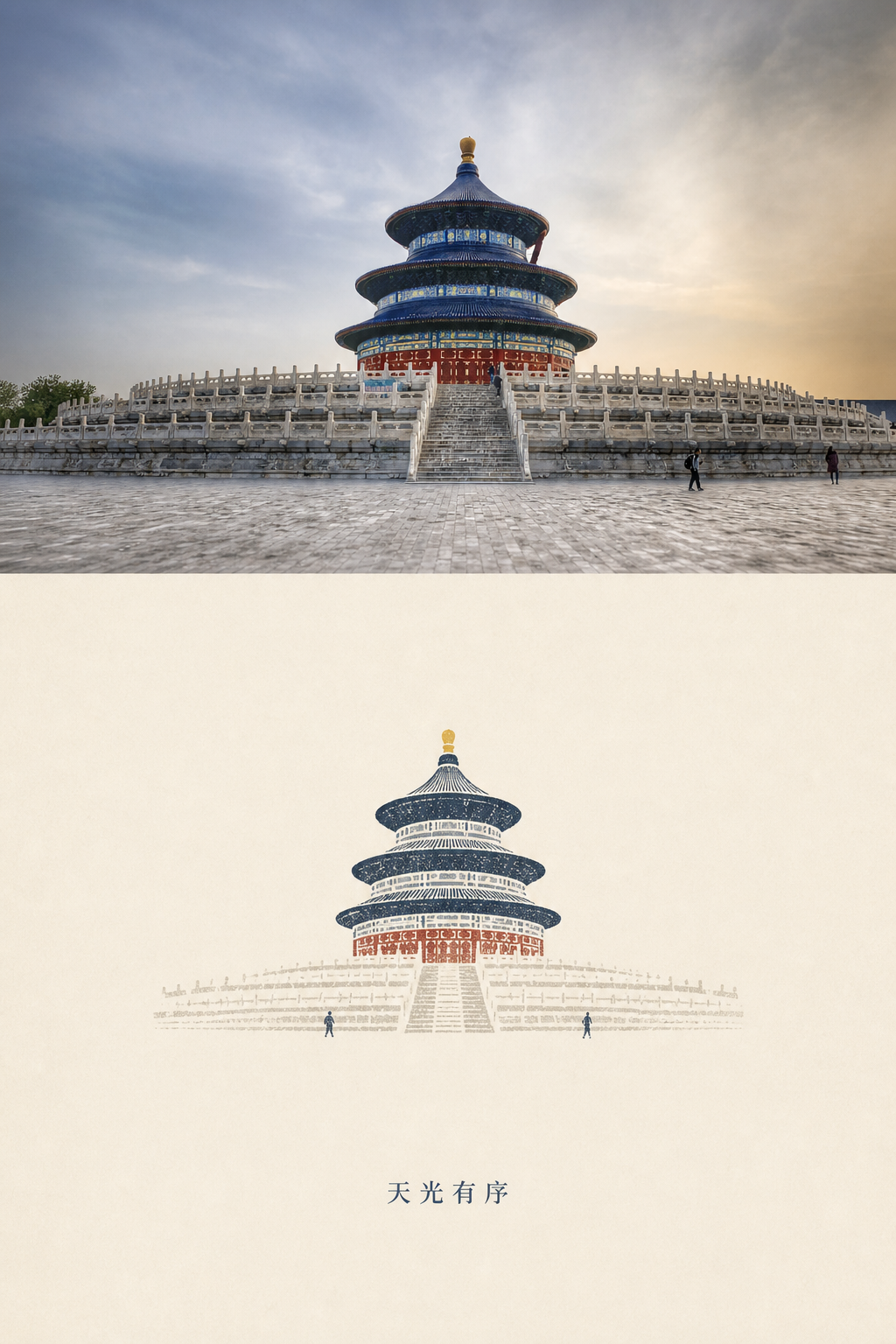
The Photo Relic Editorial Codex skill turns one photo into a vertical piece: the photo on top and a paper print below (Paper Beijing series)
Wu Haoyang (GitHub @wnby) open-sourced a Codex image skill (MIT): give it a photo and Codex calls an image tool to make a vertical piece—the photo on top, a minimal "paper print" distilled from it below (outline, a few deep-blue ink blocks, one warm accent, a tiny title). The repo ships six "Paper Beijing" samples (Temple of Heaven, Corner Tower, Bird's Nest, China Zun, Great Wall, geese). Chinese creator @xunana1017 recommended it on Nov 1. We cloned it, read SKILL.md and the reference prompt, and inspected the six samples; we did not generate new images in Codex.
Visit site Photo Relic Editorial(wnby/photo-relic-editorial) ↗- Pricing
- Free
- Region
- Global
- Where it's from
- Chinese community
- Added
- Nov 3, 2026
- Tested on
- Nov 3, 2026
- Version we used
- wnby/photo-relic-editorial commit 2232da1 (2026-08-05); not run in Codex
- Original author
- 吴昊阳 (wnby) ↗
- Our test
- Partly tested
- Cost / time
- The skill is MIT and free; images consume the image-generation allowance of your Codex / ChatGPT plan.
The task
Turn travel or city photos into a consistent series of "photo + abstract print" vertical images for social covers, instead of letting AI repaint the whole photo.
Steps
- Install: `npx skills add https://github.com/wnby/photo-relic-editorial --skill photo-relic-editorial`, or copy the photo-relic-editorial folder to `~/.codex/skills/` (Windows: `%USERPROFILE%\.codex\skills\`), then restart Codex.
- Pick a photo you took with a clear subject outline (old buildings, landmarks, skylines, bridges, reflections, lines of people work best).
- Attach it in Codex and paste the prompt below. For a Chinese series add: Make it feel like the "Paper Beijing" series, with a short four-character Chinese title.
- The skill picks 3–5 cues from the photo (subject, mood, palette, light, structure), chooses layout/mark weight/title mode, then calls the image tool for one vertical image.
- Check against the Quality Gate in SKILL.md: subject readable at thumbnail size, print colours come from the photo, tiny title, no watermarks/stickers; if one item clearly fails, regenerate once targeting it.
- For a series, keep the same recipe (paper tone, ink, title mode) and swap photos.
Prompt
Use $photo-relic-editorial to turn this photo into a Photo Relic artwork.
What the author says
@xunana1017: great taste; it doesn't replace the real photo but distils outline, light, colour and mood into a minimal paper-textured print, with explicit quality checks (subject must stay recognisable); good for travel photos, social covers, city series. Author README: keep the real photo on top, generate a recognisable, restrained "paper relic" below.
Our test
Cloned wnby/photo-relic-editorial (commit 2232da1, 2026-08-05); parsed SKILL.md frontmatter with PyYAML (name/description OK); read the 146-line SKILL.md, the 156-line references/afterimage-editorial-prompt.md and agents/openai.yaml; checked size and metadata of the six PNGs in examples/paper-beijing and viewed the Temple of Heaven sample. We did not install it in Codex or generate new images from our own photos.
What we found when we tried it:SKILL.md is concrete: pick 3–5 source cues, choose one option on each of five axes (layout, relic grammar, mark weight, title mode, motion seed), then a 10-item Quality Gate with at most one regeneration. All six samples are 1024×1536 with embedded C2PA saying "created by gpt-image, trainedAlgorithmicMedia"—so the "real photo" half is model-redrawn too. In the Temple of Heaven sample the halves match; the print keeps the three blue roofs, red wall, stairs and two tiny figures and reads fine at thumbnail size.
How to get in
Public GitHub repo with Chinese/English README. Needs Codex (a ChatGPT account) with image generation. The Chinese recommendation is an X Article (X login needed).
Who it suits
People with a stack of travel/city photos who want a consistent cover series; designers already using Codex.
Pitfalls
- It is just a SKILL.md plus a reference prompt, not image software; output depends on an image-generation tool being available in Codex.
- "Keep the real photo on top" is an instruction to the model, not a pixel paste: the six samples we inspected are all 1024×1536 with C2PA metadata saying gpt-image created them (trainedAlgorithmicMedia), so the top photo is re-rendered too. If fidelity matters, paste your original back over the top half yourself.
- Busy or low-contrast photos (indoors, close-up portraits) are outside what the author recommends.
- Last commit is 2026-08-05—the recommendation is a resurfaced project; fine for a skill, but don't expect fast updates.
- Only use photos you own or may use; outputs carry AI-provenance metadata, so check platform labelling rules before commercial use.
Images
More in this category
- Turn a selfie into a transparent animated sticker setImageSeedream 5.5JimengHuashu skillSkill is free; image gen uses Jimeng credits◐ Partly testedChina
- Two minutes to give agents GPT stills and GIFsImageopenai-imageMCPGrok BotMCP free; images use OpenAI credits◐ Partly testedOverseas
- One sentence to batch WebP and trim edgesImageimage-processingClaude CodePillowSkill free; needs Claude Code + Pillow◐ Partly testedOverseas
- Paint one dieline, fold a low-poly GLB with a Fold clipImageOrigamiClaude CodeBlenderSkill free; paint ~$0.10–0.25 each◐ Partly testedOverseas
- Pixel VFX as code—plus a Claude refine loopImagepixelfxClaude Codepixel VFXLib+skill free; new FX need Claude◐ Partly testedOverseas